Open a blank Word document. Begin updating your resume.
And then you spend twenty minutes wondering where to start.
Should education be the priority? What if you have no work experience? Is a simple template better than a colourful one? And will the company’s hiring software even be able to read it?
If you’ve been asking yourself these questions, you’re not alone.
In 2026, picking the right resume format is not about making everything look fancy. “This is about helping you make sense of your experience.
Whether you’re applying for your first job, looking for a better opportunity or changing careers, this guide will assist you to choose a format that works for you.
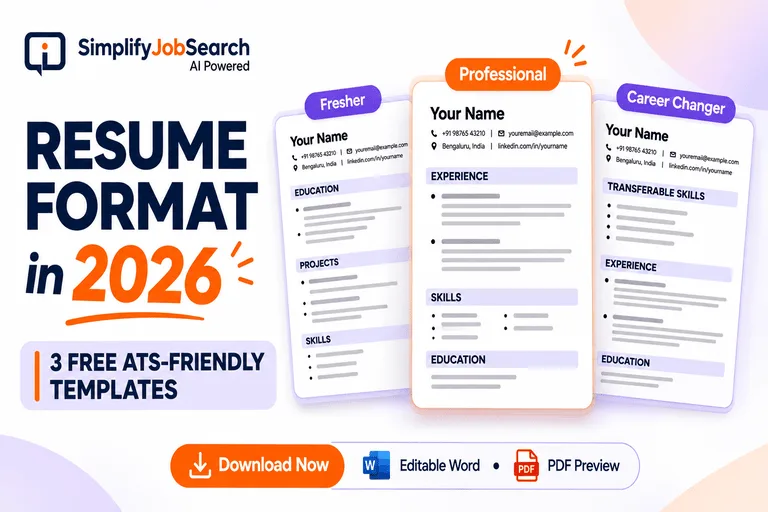
And there are three downloadable resume templates that you can edit and make your own.
What is a resume format?
A resume format is simply how you organise the information about your skills, education, and work experience.
It’s the structure that allows someone to know your background without having to sift through a messy page.
Recruiter takes 2 resumes.
You have different fonts, long paragraphs and information all over the place.
The other has obvious headings, legible text and relevant experience near the top of the page.
The second resume is easier to review, although both candidates may have similar skills.
And that is the aim.
Your resume should make it easier for people to find your strengths, not harder.
What Is the Best Resume Format in 2026?
There is no one best format for everyone.
A college graduate and someone with eight years experience have different stories. They shouldn’t both have the same resumes.
There are three popular formats.
1. Reverse Chronological Resume Format
The format lists your most recent position first, and then earlier positions.
If you have worked in the same field for some time, it is an easy choice.
Great for: Experienced pros, those aiming for a promotion, and candidates with a fairly consistent employment history.
A typical structure would be:
- Name & Contact details
- Professional Experience
- Skills
- Work experience, most recent first
- Education
- Certifications, if relevant
Most of the focus is on your recent experience because that tells employers what you’re doing now.
2. Functional Style Resume
A functional resume emphasises skills over detailed work experience.
If you’re coming back after a long break or changing careers it might seem appealing.
But it’s not always the best option.
Some recruiters want to know where and when you’ve applied your skills. A format that obscures employment details can make that more difficult.
If you choose this route, make sure your employment history is visible and accurate.
3. Combination Resume Style
A combination resume has a combination of skills and a clear work history.
This can be useful if you are moving into a new field.
For example, a customer support professional moving into data analytics can highlight Excel, reporting and recent projects without hiding previous customer support experience.
Best for: Career changers and professionals whose transferable skills are relevant to the target role.
For most applicants I would keep a simple chronological format. If you’re in a new career direction, a combination layout might better tell your story.
2026 Free ATS-Compliant Resume Templates
It’s helpful to read about resume formats. But spotting one is a lot easier.
That’s why we’ve added three editable Word templates.
Download the one that suits your situation, replace the sample text and save your own version.
The PDF previews show what the layouts look like before you start editing.
1. Free Download Resume Format for Freshers
If you are a fresher you might feel that you don’t have enough to fill up your resume.
Not a full time job. Maybe one internship. A couple of projects in college.
But there are still things of yours worth showing.
A good fresher resume format should have:
- Education and related coursework
- Job related or technical skills
- Projects of an academic and personal nature
- Intern or volunteer experience
- Certifications and practical training
Example:
Junior Data Analyst – Fresher
Skills: SQL, Excel, Power BI
Project: Designed a sales dashboard in Excel to organise and display sample transaction data.
Education: B.Com in XYZ University
This provides a recruiter more than just words “Hardworking fresher looking for an opportunity”.
And no need to make up experience you don’t have.
Fresher Resume Format 2026 Download Word Template Editable
View Resume Format for Fresher – PDF Preview
For more detailed guidance, read our fresher resume writing guide for 2026..
2. Professional Resume Format – Download Free
The challenge is different if you have been working for a few years.
You probably have tonnes to add. The trick is figuring out what’s worth the space.
In professional resume formats, the most recent experience and strongest relevant achievements should be listed first.
Example:
Software Engineer – 4 Year Experience
Skills: Angular, TypeScript, Node.js, REST APIs
Experience: Worked on developing features for web applications and collaborated with backend teams on API integrations.
Education: B.Tech (Computer Science).
Don’t list every single task you’ve ever done, discuss the responsibilities that matter for the new job.
If you have tangible accomplishments that produce measurable results, list them. Even if you don’t have numbers, good descriptions of your work are valuable.
Download Professional Resume Format 2026 – Editable Word Template
View Professional Resume Format – PDF Preview
3. Career Change Resume Template — FREE Download
Writing a resume can be surprisingly hard when you are changing careers.
And you want to move on, but your past experience takes up most of the page.
Do you take it off?
Usually not.
Some of the skills you learned in your last job may be relevant in your next job.
Think of a teacher going into a corporate training job.
Relevant experience includes communications, lesson planning, explaining complicated topics and assisting people to learn.
A combination format can include these transferable skills along with recent courses or practical projects.
Download Career Change Resume Format 2026 – Editable Word Template
View Career Change Resume Template PDF Preview
Before you send your resume to an employer, make sure you replace each placeholder with your real experience.
How to Format Your Resume to Be ATS Friendly
ATS is an abbreviation for Applicant Tracking System.
These systems are used by employers to receive, organise and manage job applications. Some systems also support searches, filters and screening tools.
But there is something to understand.
There isn’t a single resume template that will get you past every ATS.
Employers have different systems, different hiring ways.
What you can do is make your resume easy to read and get information from.
Choose a simple layout
Design for a single column layout.
Use clear headings like Work Experience, Skills and Education.
Don’t put important information in complex graphics, floating text boxes, or decorative tables.
Use fonts that are readable
Familiar fonts such as Arial, Calibri and the like are good.
Use body text at about 10-12 point size. Maintain consistent spacing.
No need to use tiny text to cram everything onto one page.
Writing skills in context
Say the job description requires SQL and Excel.
If you have used those tools, include them in your skills section and specify where you used them.
Rather than:
“”Very good computer knowledge.
Try this:
“Querying project data with SQL and creating monthly reports with Excel.
The second version gives the recruiter something concrete to grasp.
The University of Pennsylvania Career Services resume guide also recommends simple layouts, readable fonts, and clear organization.
For more practical ATS advice, check out our ATS-friendly resume guide.
One-page or two-page resume?
This question creates a lot of unnecessary stress.
For a fresher with a couple of projects and an internship, one page is usually enough.
If you have some years of working experience, two pages may be reasonable if the experience is relevant.
Don’t delete key achievements just to fit into a one-page rule.
And don’t pad out a short resume to two pages thinking it looks more professional.
Keep what helps the employer see you as a good fit for the job.
PDF vs. Word: What Resume Format Should You Use?
PDF and Word documents are both commonly used.
PDF is helpful because it generally keeps your layout the same on different devices.
Some employers or application systems may ask for Word documents because they are easier to edit.
So which one is better?
First, do as your employer tells you.
If the app requires DOCX, upload DOCX. If PDF is accepted, a correctly exported text based PDF is usually a good choice.
Open the final file in whatever format you have used, to make sure that the text can be selected and copied properly.
Do not upload a photo of your resume saved as a pdf.
5 Resume Formatting Mistakes to Steer Clear Of
Sometimes the smallest issues can make a resume frustrating to read.
Check these before you put it on:
- Too many fonts and colours. Keep the design consistent.
- Very long paragraphs. Use clear and focused bullet points where it helps.
- Irrelevant personal information. The information must be relevant to the job and any information the employer needs.
- Contextual skills. Show that you’ve used important tools or skills.
- Forget to check the final file. Check for broken spacing, missing text and outdated contact details.
One more thing. Don’t add skills you haven’t learned just because they are in the job description.
Your resume needs to be accurate, not just keyword stuffed.
Tailor Your Resume to the Job You’re Applying For
A clean template is a good start.
But that won’t fix everything.
You can have a beautifully organised resume and still forget to mention a relevant project or skill.
Before you apply, make sure your resume matches the actual job description.
Look at the important requirements. Which ones do you genuinely meet? Have you made that experience visible?
If you’re unsure, the SJS Resume Score Checker can help you review the match between your resume and the role.
You can also use Resume Gap Analysis to understand what your resume currently shows and what may need improvement.
A score or suggestion isn’t a hiring decision. Use it as feedback rather than a guarantee of selection.
Want to Build a Job-Specific Resume Without Starting From Scratch?
Maybe you’ve already downloaded a template.
But you’re still staring at the summary section, wondering what to write.
That’s understandable.
Explaining your own experience clearly can be harder than doing the work itself.
With the Simplify Job Search AI Resume Generator, you can prepare a resume tailored to a job description, rather than writing every section from scratch.
Review the generated content carefully. Make sure every skill, project and achievement represents something you have done.
Build Your Job Specific Resume with SJS
Resume Formats: Frequently Asked Questions
The Best Resume Format for Freshers in 2026
Start with a clean, one-page resume covering education, practical skills, projects and internships. Select the order that best describes your strengths.
What is the best ATS-friendly resume format?
A simple single-column format with standard headings and readable text is often a safe bet. There’s no one format that will guarantee you’ll be accepted by every ATS.
Can you have a two page resume?
Yes. Two pages is fine if you have enough relevant experience. Concentrate on quality, not on some random number of pages.
Can we download resume format in word?
Yes. This article includes three templates in editable Word format with PDF previews to help you choose.
Should you use the same resume for all jobs?
You can keep one master resume but update the relevant summary, skills and experience for positions you are serious about. Make changes only if it rings true to your background.
Final Thoughts: Your Resume Doesn’t Have to Be Fancy
Maybe you’ve seen others’ resumes and thought, “Does mine look professional enough?”
Theirs might have a colourful design, fancy icons, or a layout you’ve never seen before.
But a good resume is not a design competition.
It’s an opportunity to demonstrate what you know, what you’ve accomplished and the kind of work you’re prepared to undertake.
Select the format that best matches your experience. Keep it clean . If you want a starting point, download a template.
And allow yourself to continue to make it better.
The best resume format is a format that lets the right person understand your experience without confusion.